Do you know how to investigate a Malware Hash using threat intelligence and how that can help to provide provide protection against unknown threats? If not, then you are in the right place. Here, we will talk about malware and related investigation techniques in detail.
Moreover, we will introduce you to a reliable threat intel solution offered by a reputable VAPT service provider. What are we waiting for? Let’s get straight to the topic!
What Is a Malware Hash?
A malware hash is a distinct, fixed-length cryptographic fingerprint produced by applying a mathematical method to the binary contents of a malicious file. It serves as the malware's digital identification, enabling security analysts to quickly identify and mark identical copies without having to open or run the risky file.
Hashes are crucial Indicators of Compromise (IOCs) across threat intelligence platforms since altering even one byte of code entirely alters the output string. Let’s talk about what a Malware Hash is and how you can investigate it via threat intelligence that will help businesses!
Types of Malware Hashes: MD5, SHA-1, and SHA-256
|
S.No. |
Types |
What? |
|
1. |
MD5 |
A 128-bit hash method that is incredibly speedy for fast lookups, but because of collision issues, it is no longer cryptographically secure. |
|
2. |
SHA-1 |
Because of potential collision attacks, a 160-bit hash method that provides greater uniqueness than MD5 is mostly discarded in contemporary security. |
|
3. |
SHA-256 |
The gold standard for threat intelligence platforms and contemporary malware detection is a highly secure 256-bit hash technique. |
Why Is a Malware Hash Important?
A malware hash is important for the following reasons:
1. Unique Identification: Acts as a digital fingerprint that, without depending on changing file names, accurately isolates certain malware samples.
2. Safe Analysis: Enables security teams to locate, monitor, and investigate potentially harmful files in threat databases without opening or running them.
3. Rapid Threat Sharing: Serves as a lightweight Indicator of Compromise (IOC) that security experts may instantly disseminate over the world to alert peer organizations.
4. Automated Prevention & Blocking: Allows for the quick detection, quarantine, and blocking of known dangerous binaries throughout an organization using security measures like EDR and AV.
5. Integrity Verification: Verifies if a file has been altered or tampered with, ensuring analysts are looking into the precise binary found in an occurrence.
How Do Malware Hashes Support Threat Intelligence Investigations?
Malware hashes support threat intelligence investigations in the following ways:
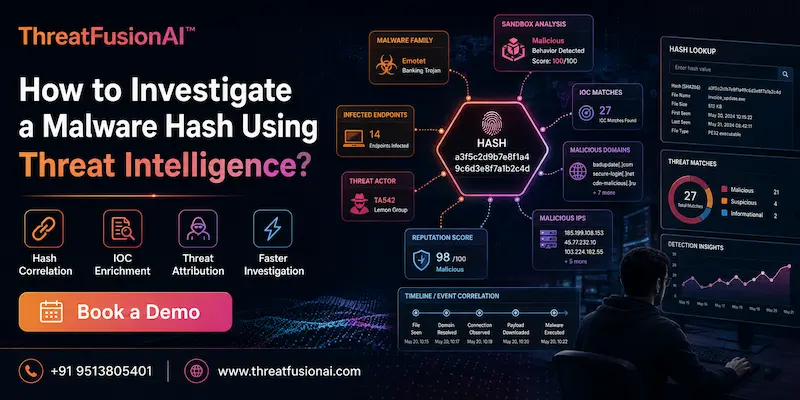
● Pivoting to Infrastructure: Links a sample file to related IP addresses, domains, and command-and-control servers.
● Mapping Threat Actor Attribution: Connects known Advanced Persistent Threat (APT) groups and their campaigns to certain binaries.
● Accelerating Triage via Aggregated Reputation: Vendor threat scores are instantly retrieved across platforms to categorize files without the need for manual inspection.
● Proactive Enterprise Threat Hunting: Finds hidden or previous compromises by searching network-wide logs for historical hash matches.
● Clustering Malware Families: Assembles similar samples to find more widespread malware variations and evolutionary trends.
How to Obtain a Malware Hash Safely?
|
S.No. |
Factors |
How? |
|
1. |
Extract from Endpoint Alerts |
Directly copy pre-calculated hashes from antivirus detection logs, SIEM, or EDR. |
|
2. |
Use Command-Line Utilities |
Create hashes without executing the file by utilizing built-in tools such as PowerShell (Get-FileHash) or terminal commands. |
|
3. |
Isolate in a Sandbox |
For automated hash extraction, move dubious files straight into secure, isolated sandbox environments. |
|
4. |
Never Double-Click or Execute |
Use CLI tools, right-click context menus, or specialized analysis software only when interacting with questionable files. |
|
5. |
Compress with a Password |
To avoid unintentional execution and antivirus intervention, store and transfer malware samples in password-protected ZIP/RAR archives. |
Prerequisites for Malware Hash Analysis
The following are some prerequisites for malware hash analysis:
a) Valid Hash Extraction & Verification: Before searching platforms, make sure the hash is correctly produced and formatted (MD5, SHA-1, or SHA-256).
b) Access to Threat Intelligence Platforms: Protect active login credentials or API keys for services such as Hybrid Analysis, AlienVault OTX, and VirusTotal.
c) Isolated Analysis Environment: To avoid unintentional local execution while managing files, work in a specialized, segregated virtual machine or sandbox.
d) Operational Security (OpSec) Compliance: When sending queries, follow privacy measures to prevent disclosing proprietary files or sensitive internal metadata.
e) Internal Log & Telemetry Access: To look for hash occurrences throughout the company network, keep query access to SIEM, EDR, and firewall logs.
How to Investigate a Malware Hash Using Threat Intelligence?
You can investigate a malware hash using threat intelligence in the following ways:
1. Search the Hash in Threat Intelligence Platforms: To verify current records, enter the SHA-256, SHA-1, or MD5 string into programs like VirusTotal, AlienVault OTX, or SentinelOne.
2. Analyze Malware Reputation and Detection Results: To rapidly determine whether the file is suspicious, benign, or malicious, assess vendor detection ratios and threat scores.
3. Review Malware Family and Variant Information: Determine common vendor designations (such as Trojan, Ransomware, and InfoStealer) to comprehend the file's basic classification and ancestry.
4. Investigate File Metadata and Behavioral Indicators: Analyze the file size, digital signatures, compilation timestamps, and dynamic execution behaviors captured in sandbox runs.
5. Analyze Related IP Addresses, Domains, and URLs: To extract related command-and-control (C2) infrastructure and network-level Indicators of Compromise (IOCs), pivot off the hash.
6. Check Historical and Campaign-Based Threat Intelligence: To determine purpose, compare the hash to threat actor profiles, documented APT campaigns, and MITER ATT&CK strategies.
7. Correlate Hash Intelligence With SIEM and EDR Data: To find any enterprise systems that have viewed or used the hash, query internal endpoint and network logs.
8. Assess the Malware Risk and Determine Its Impact: Analyze compromised data, impacted hosts, and possible lateral movement to determine the possible blast radius.
9. Document Findings and Initiate Incident Response: Update security blocklists, run remediation playbooks, isolate impacted endpoints, and document all findings in an incident ticket.
Best Threat Intelligence Tools for Malware Hash Investigation
|
ThreatFusionAI |
Combines AI analytics to connect file hashes with MITER ATT&CK actor mappings, phishing infrastructure, and global breach data. |
Common Challenges When Investigating Malware Hashes
The following are some common challenges when investigating malware hashes:
● Hash Mutation and Polymorphism: By changing a single byte of code, attackers can quickly get around hash lookups and create a whole different hash for the identical malware payload.
● Zero-Day and Custom Malware: On threat intelligence platforms, newly generated binaries or targeted bespoke attacks do not yield any reputation scores or previous matches.
● Lack of Contextual Intelligence: Although a raw hash match verifies that a file is malicious, it does not provide an explanation for the file's entry into the system, its execution route, or its intended target.
● Operational Security (OpSec) Risks: Threat actors may be alerted that their activity has been found by searching for sensitive or unpublished internal hashes on public platforms.
● Alert Noise and False Positives: False positives might result from broad vendor signatures or incorrectly classified benign files, squandering analyst time on innocuous software binaries.
Limitations of Hash-Based Malware Analysis
The following are the limitations of hash-based malware analysis:
a) Extreme Fragility to Minor File Changes: Hash matching is broken if even one byte is changed.
b) Inability to Detect Zero-Day Malware: In threat databases, unseen binaries provide no matches.
c) Complete Lack of Behavioral Context: Files are identified by hashes, not by their actions.
d) Vulnerability to Polymorphic and Oligomorphic Threats: Traditional hash signatures are consistently circumvented via code self-mutation.
e) No Blind Pattern or Structural Similarity Matching: Without specific fuzzy hashing, exact methods are unable to identify code overlaps.
Conclusion: Turning Malware Hashes Into Actionable Threat Intelligence
Now that we have talked about how to investigate a Malware Hash using threat intelligence, you might want to get your hands on a dedicated threat intel solution. For that, you can go for ThreatFusionAI, a dedicated threat intelligence platform offered by Craw Security.
ThreatFusionAI can help businesses by notifying them about the latest cyber threats and malicious risks, so that they can enhance their security measures for future threats. Thus, you will feel secure in your working environment. What are you waiting for? Contact, Now!
Frequently Asked Questions
About Malware Hash
1. What is a malware hash and how does it help identify malicious files?
Security systems can quickly recognize and warn of known harmful files without opening them thanks to a malware hash, a unique cryptographic digital fingerprint created from a file's binary code.
2. Which malware hash types are commonly used in threat intelligence?
The following malware hash types are commonly used in threat intelligence:
a) MD5,
b) SHA-1, and
c) SHA-256.
3. How can I safely obtain a hash from a suspicious file?
You can safely obtain a hash from a suspicious file in the following ways:
a) Copy Pre-Calculated Hashes from Security Logs,
b) Use Built-in Command-Line Utilities,
c) Isolate the File inside a Virtual Machine or Sandbox,
d) Lock Down File Interactions (Avoid Double-Clicking), and
e) Store and Transfer in Password-Protected Archives.
4. How do I investigate a malware hash using threat intelligence platforms?
You can investigate a malware hash using threat intelligence platforms in the following ways:
a) Submit the Hash to Aggregation Platforms,
b) Evaluate Detection Ratios & Reputation,
c) Analyze Sandbox Behavior & Metadata,
d) Pivot to Extract Network Infrastructure, and
e) Correlate with Internal SIEM/EDR Logs.
5. Which threat intelligence tools can be used to analyze malware hashes?
The following threat intelligence tools can be used to analyze malware hashes:
a) ThreatFusionAI,
b) VirusTotal,
c) AlienVault OTX (Open Threat Exchange),
d) Hybrid Analysis, and
e) Recorded Future.
6. What information can be discovered from a malware hash?
The following information can be discovered from a malware hash:
a) Malware Family & Classification,
b) File Metadata & Static Properties,
c) Execution Behavior & TTPs,
d) Associated Infrastructure (IOCs), and
e) Threat Actor & Campaign Attribution.
7. How can malware hash analysis reveal related IP addresses and domains?
Malware hash analysis can reveal related IP addresses and domains in the following ways:
a) Extracting Sandbox Execution Logs (Dynamic Analysis),
b) Correlating Aggregated OSINT Infrastructure,
c) Analyzing Hardcoded Configurations (Static Analysis),
d) Pivoting via Graphing & Community Pulses, and
e) Mapping Campaign & Threat Actor Infrastructure.
8. How can I determine whether a malware hash is associated with a known threat actor?
You can determine whether a malware hash is associated with a known threat actor in the following ways:
a) Cross-Reference Global Threat Intelligence Platforms,
b) Pivot via Shared Network Infrastructure (C2),
c) Map Extracted Behaviors to the MITRE ATT&CK Framework,
d) Analyze Code Overlap and Shared Libraries, and
e) Correlate Victimology and Campaign Context.
9. What are the limitations of using malware hashes for threat detection?
The following are the limitations of using malware hashes for threat detection:
a) Extreme Sensitivity to Minor Modifications (Avalanche Effect),
b) Ineffectiveness Against Polymorphic & Metamorphic Malware,
c) Blindness to Zero-Day and Custom Attacks,
d) Complete Lack of Behavioral Context, and
e) No Built-In Code Similarity Matching.
10. How can organizations use malware hash intelligence to improve their cybersecurity?
Organizations can use malware hash intelligence to improve their cybersecurity in the following ways:
a) Automated Perimeter & Endpoint Defense,
b) Proactive Enterprise Threat Hunting,
c) Rapid Incident Response Triage,
d) Contextual IOC Pivoting, and
e) Collective Defense & Intelligence Sharing.